


Do this part of the exercise on your computer, not on the server.
Configure a web application through environment variables
The goal of this exercise is to improve the configuration step of the previous
exercise: Guess It will take its configuration from environment
variables, instead of having it written in server.js.
On this page
Table of contents
 Legend
Parts of this exercise are annotated with the following icons:
-
 A task you MUST perform to complete the exercise
-
 Optional step that you may perform to make sure that
everything is working correctly, or to set up additional tools that are not required but can
help you, or optional extra exercises to explore the topic further
-
 Advanced tips on how to go further (or
challenges!)
 The end of the exercise
-
 The architecture of the software you ran or
deployed during this exercise
-
 Troubleshooting tips: how to fix common problems you might
encounter
Requirements
Make sure you have completed the previous exercise first. You
will need its clone in /srv/guessit, and the guessit-ex directory of your
SFTP deployment, which still holds the password of the guessit database user.
Why are we doing this?
At the end of the previous SFTP deployment exercise, the server.js
file of your deployment had to contain the database password. If it was not
already the right one, you edited it on your server, and left it uncommitted.
Either way, the password is in the code.
The third factor of The Twelve-Factor App, Config, asks for a strict separation of the configuration from the code. The configuration is what can change between deploys, such as the database password or the database port, while the code stays the same. An application that reads its configuration from environment variables can be deployed anywhere without changing a line of its code.
Stop the Git deployment
If Guess It is still running from the previous exercise, go to the terminal
where it runs, and press Ctrl-C. Only one program at a time can listen on port 3000.
If it is not running, there is nothing to stop: it stopped when the SSH connection you had started it in was closed.
Update the configuration

Open the guessit-ex directory of your fork, on your computer, in your editor.
The configuration is at the top of server.js:
// The port the application listens on.
const PORT = 3000;

// The URL used to connect to the PostgreSQL database. It has the shape
// postgresql://USER:PASSWORD@HOST:PORT/DATABASE. Change the password to match
// the one you set when you ran schema.sql.
const DATABASE_URL =
  'postgresql://guessit:change-me-now@localhost:5432/guessit';
Your DATABASE_URL may have another password, and another port, if you
configured it for your computer or for your server.
Modify these lines to take the configuration from the environment. In Node.js,
the environment variables of the process are in process.env. For example,
instead of:
const PORT = 3000;Use this:
const PORT = process.env.PORT || 3000;With this code, PORT is the value of the PORT environment variable if it is
set, or 3000 if it is not.
 More information
The || operator returns its left side if it is truthy, and its right side
otherwise. An environment variable that is not set is undefined in
process.env, which is falsy.
Do the same for DATABASE_URL, with the DATABASE_URL environment variable.
Its default can be the same URL without the password:
postgresql://guessit@localhost:5432/guessit.
Warning
Do not put a password in the default value of DATABASE_URL. A password
must not be written in the code, as the Config section of The Twelve-Factor
App explains: anyone who can read your repository, or its
history, could read it.
Update the comments above both lines too, so that they say where the configuration comes from: “Change the password to match…” is no longer true.
Update the README
The README.md file of your fork explains how to set up Guess It. Its setup
step 2 still says to put the password in server.js:
2. Set the same password in the `DATABASE_URL` at the top of `server.js`.Replace that step with this one:
2. Whenever you run the application, set the `DATABASE_URL` environment
   variable to the URL of the database, with the same password.
Commit and push your changes
Check what you are about to commit:
$> git status
$> git diff server.js README.md
Your copy may have other changes that you have not committed, such as the
password you put in schema.sql during the SFTP deployment. Make sure
no password is left in server.js, then commit only server.js and
README.md, and push them to your fork on GitHub:
$> git add server.js README.md
$> git commit -m "Take the configuration from the environment"
$> git push Tip
To run Guess It on your computer from now on, give it your local configuration
in the environment, in the same way as on your server below: your local
password, and the port 5434 if you run PostgreSQL with Docker Desktop.
Pull the latest version on the server
Connect to your server for the rest of the exercise.
Go into your deployment, and check whether server.js has a change you have not
committed:
$> cd /srv/guessit

$> git status
If Git lists server.js as modified, you edited its password during the
previous exercise. You no longer need that change, since the configuration will
come from the environment. Discard it with git restore, which puts back the
version of the file from the last commit:
$> git restore server.jsThe password is not lost: it is still in ~/guessit-ex/server.js, in your SFTP
deployment.
More informationGit would not have let you pull with that change. The new commit changes
server.js too, so pulling would replace your version of the file and lose your
change, and Git never throws away a change you have not committed unless you ask
it to.
Then pull the latest version of the code from GitHub:
$> git pull origin main
...
Fast-forward
 README.md | ...
 server.js | ...
...If Git does not know the remote origin, list your remotes with the
git remote command (or with git remote -v to also see their URLs), and use
the name it prints instead.
Your deployment should now have no uncommitted changes: git status should
print “nothing to commit, working tree clean”.
$> git status
On branch main
Your branch is up to date with 'origin/main'.

nothing to commit, working tree clean
Optional: run the application without its configuration
Start Guess It as in the previous exercise, without any environment variable:
$> npm run dev

> guessit@1.0.0 dev
> node --watch server.js

Guess It is listening on http://localhost:3000
Open your server’s IP address and port 3000 in your browser (e.g.
http://W.X.Y.Z:3000). The home page says that the leaderboard could not be
loaded, and the terminal shows:
Could not load the leaderboard: Error: SASL: SCRAM-SERVER-FIRST-MESSAGE: client password must be a stringThe application started, and only failed when it tried to connect to the database. Why could it not connect?
 Check your answer
DATABASE_URL is not set, so the application used its default URL, which has
no password. PostgreSQL asks the guessit user for one.
Stop it with Ctrl-C.
Run the application
Still in /srv/guessit, start the application again, but this time give it its
configuration through the environment. The database URL is the one of your SFTP
deployment, which has the password of the guessit database user:
$> grep guessit: ~/guessit-ex/server.js
const DATABASE_URL = 'postgresql://guessit:********************************@localhost:5432/guessit';
Set it for the npm run dev command (replacing the URL with yours):
$> DATABASE_URL='postgresql://guessit:********************************@localhost:5432/guessit' npm run dev

> guessit@1.0.0 dev
> node --watch server.js

Guess It is listening on http://localhost:3000NAME='value' command runs a command with an additional environment variable.
You can set several at once: EXAMPLE='value' ANOTHER='one' command.
The single quotes around the value are optional if it contains no spaces or special characters.
You do not need to set PORT: its default, 3000, is the right port for your
server.
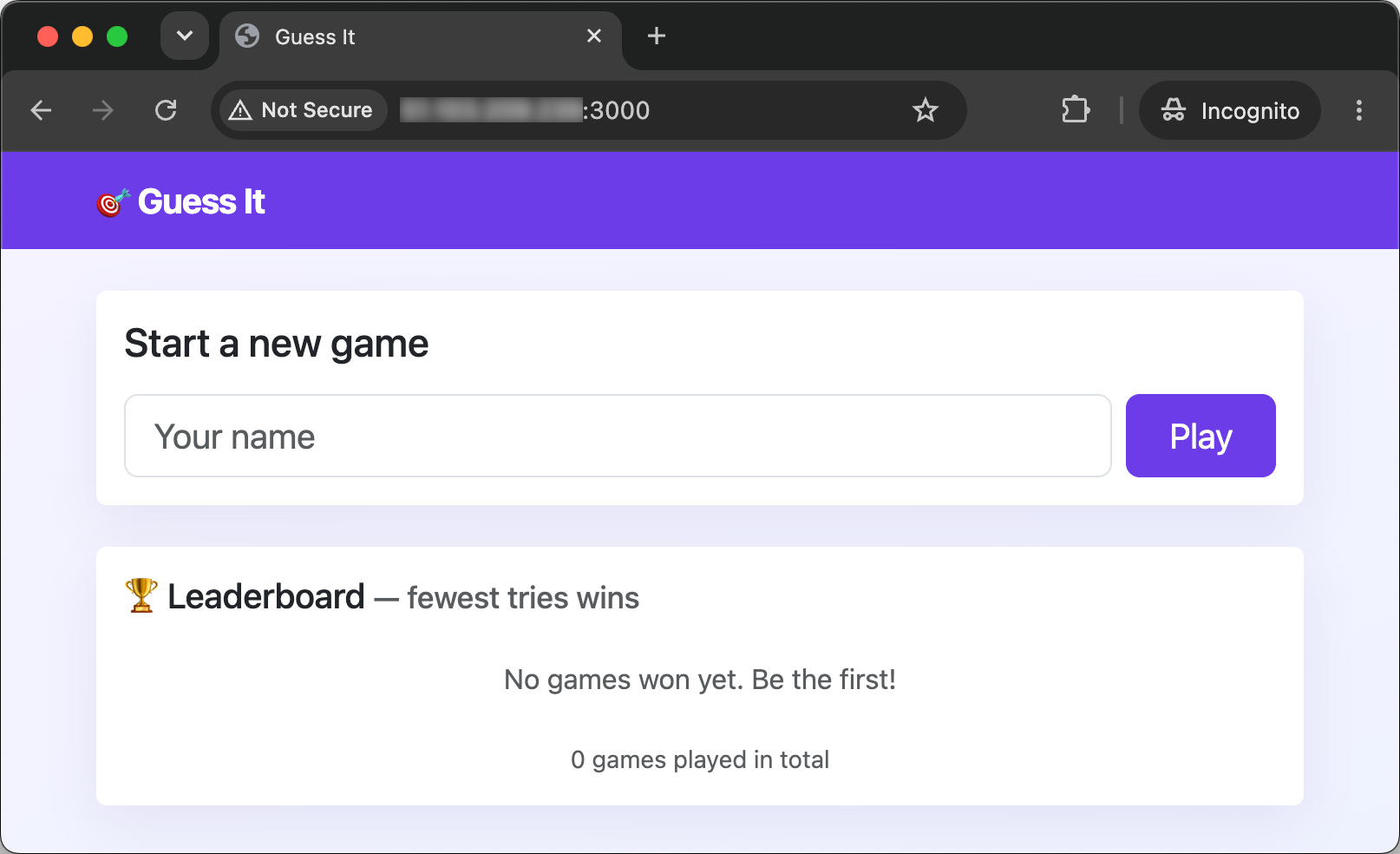
You (and everybody else) should be able to access the application in a browser
at your server’s IP address and port 3000 (e.g. http://W.X.Y.Z:3000), and its
leaderboard should show the games won on your earlier deployments.
More informationYou set the variable for npm, but it is server.js that reads it. npm runs
node --watch, which runs server.js in another process. Each process gets a
copy of the environment of the process that started it, so the variable reaches
all of them.
What have I done?
You have made Guess It configurable through the environment, as recommended in the Config section of The Twelve-Factor App.
The code no longer changes from one deploy to another. Your fork, your computer
and your server have the same server.js, and each deploy gives it its own
configuration when it starts it. A database on another port, or with another
password, needs no change to the code.
Your deployment is now exactly a commit of your repository, with nothing modified. Git can pull a new version without a local change in its way.
Configuration can have default values, as long as they are not secrets. The port and the database URL have one, but the database URL’s has no password: a password in the code would be in the repository’s history, for anyone who can read it. Not setting a default password also forces the person who deploys the application to explicitly set one rather than rely on an insecure default.
An environment variable set for a command exists only in the process that
command starts, and in the processes it starts in turn. That is how
DATABASE_URL reached server.js, through npm and node --watch.
Your configuration now lives in the command you typed. You have to type it again every time you start the application, and your shell keeps it in its history, password included.
Architecture
This is a simplified architecture of the main running processes and communication flow at the end of this exercise. It has not changed since the previous exercises: you have neither created new processes nor changed how they communicate. Only where Guess It gets its configuration from is different.
In this diagram, your browser talks to the Guess It application running on your server. Guess It talks to the PostgreSQL database server also running on your server. You started Guess It manually in your SSH session, in a shell running on the server.
Your terminal is still connected to your server over SSH, PostgreSQL is running with the application’s database, and the application’s files are on the server.
You run npm run dev, as on your computer. Your shell starts Guess It, which listens on port 3000.
You open a browser on your computer.
You type your server’s public IP address and port into it. It connects to port 3000, where Guess It is listening.
It sends an HTTP request for the home page over the connection, and waits for the answer.
Guess It works: Node.js runs its JavaScript code, which needs the leaderboard from the database.
Guess It connects to PostgreSQL on port 5432, with the database URL you configured.
It sends its query over the connection.
PostgreSQL works, running the query, while Guess It waits for the answer.
The rows of the leaderboard travel back to Guess It.
Guess It works again, building the HTML page from the rows.
The page travels back over the connection to your browser, with its stylesheets and scripts.
Your browser works, displaying the page.
Troubleshooting
Here’s a few tips about some problems you may encounter during this exercise.
client password must be a string
The home page says that the leaderboard could not be loaded, and the terminal shows:
Could not load the leaderboard: Error: SASL: SCRAM-SERVER-FIRST-MESSAGE: client password must be a stringGuess It did not get a DATABASE_URL, and used its default URL, which has no
password. Make sure you typed it on the same line as npm run dev, before it,
as in Run the application. A variable set on a line of its own is a
variable of your shell, which the commands you run next do not get.
password authentication failed for user "guessit"
The home page says that the leaderboard could not be loaded, and the terminal shows:
Could not load the leaderboard: error: password authentication failed for user "guessit"The password in your DATABASE_URL is not the one of the guessit database
user. Copy the URL from your SFTP deployment, in ~/guessit-ex/server.js, as in
Run the application.
If your previous deployments did not work either, see the same problem in the SFTP deployment.
Completed running 'server.js'
The application says it is listening, then stops at once:
...
Guess It is listening on http://localhost:3000
Completed running 'server.js'. Waiting for file changes before restarting...
Another program already listens on port 3000, most likely one of your previous deployments. Stop it as described in Stop the Git deployment, then start Guess It again.