


Connect to your cloud server with SSH for this exercise.
Deploy a web application with Git
The goal of this exercise is to deploy Guess It again, much like in the previous exercise, but using Git to put the code on the server instead of SFTP, and installing its dependencies on the server instead of uploading them.

On this page
Table of contents
 Legend
Parts of this exercise are annotated with the following icons:
-
 A task you MUST perform to complete the exercise
-
 Optional step that you may perform to make sure that
everything is working correctly, or to set up additional tools that are not required but can
help you, or optional extra exercises to explore the topic further
-
 Advanced tips on how to go further (or
challenges!)
 The end of the exercise
-
 The architecture of the software you ran or
deployed during this exercise
-
 Troubleshooting tips: how to fix common problems you might
encounter
Requirements
Make sure you have completed the previous exercise first. Your new
deployment uses the same Node.js, the same PostgreSQL database and the same
guessit database user, with the password you chose then.
Why are we doing this?
Why a new deployment, when your server already has Guess It in ~/guessit-ex
from the previous SFTP deployment exercise? That directory is not your
codebase. It is a copy of the directory on your computer as it was the day you
uploaded it, with your configuration in server.js, the node_modules
installed on your computer, and anything else that happened to be there. Nothing
ties it to a commit of your repository, so nothing tells you which version of
the code it is.
The first factor of The Twelve-Factor App, Codebase, asks for one codebase tracked in revision control, and many deploys of it. Your codebase is the repository of your fork, on GitHub. The copy on your computer is one deploy of it, and your server will have another: a clone of the same repository, made from the codebase rather than copied from another deploy.
Using Git instead of copying files manually makes our deployments more robust, predictable, and easier to update.

Is uploading with SFTP wrong, then? It is still the classic way of putting a PHP website online: many shared hosting offers give you an SFTP account and a directory, and nothing else. It works, but it has the flaws you have just read about: what runs is whatever you uploaded, not a version of your codebase. When a host lets you deploy with Git, or deploys automatically from your repository, prefer that.
Optional: find your way around your server again
If it has been a while since you deployed Guess It with SFTP, take a few minutes to check that your deployment is still there, and to remember what is where and how it got there.
The application’s files are in the guessit-ex directory of your home
directory. You copied them there from your computer with your SFTP application
(e.g. Cyberduck or WinSCP), node_modules included:
$> ls ~/guessit-ex
README.md  node_modules  package-lock.json  package.json  schema.sql  server.js
You configured the application on your computer before uploading it. Its
DATABASE_URL has the password of the guessit database user, which you put in
schema.sql too:
$> grep guessit: ~/guessit-ex/server.js
const DATABASE_URL = 'postgresql://guessit:********************************@localhost:5432/guessit';
Node.js is the one you installed from NodeSource, with APT:
$> node -v
v26.x.y
PostgreSQL, which you also installed with APT, should be listening on port 5432 of the loopback address:
$> sudo ss -tlpn
State   …   Local Address:Port    …  Process
...
LISTEN  …       127.0.0.1:5432    …   users:(("postgres",…))
...
Guess It does not appear: nothing listens on port 3000. It stopped when the SSH connection you had started it in was closed, after the previous exercise.
The guessit database, which you created by running schema.sql as the
PostgreSQL superuser, holds the games played on your deployment. Count them:
$> sudo -u postgres psql -c 'SELECT count(*) FROM game' guessit
 count
-------
     2
(1 row)
Go into the uploaded directory, and start the application again, as you did then:
$> cd ~/guessit-ex

$> npm run dev

> guessit@1.0.0 dev
> node --watch server.js

Guess It is listening on http://localhost:3000
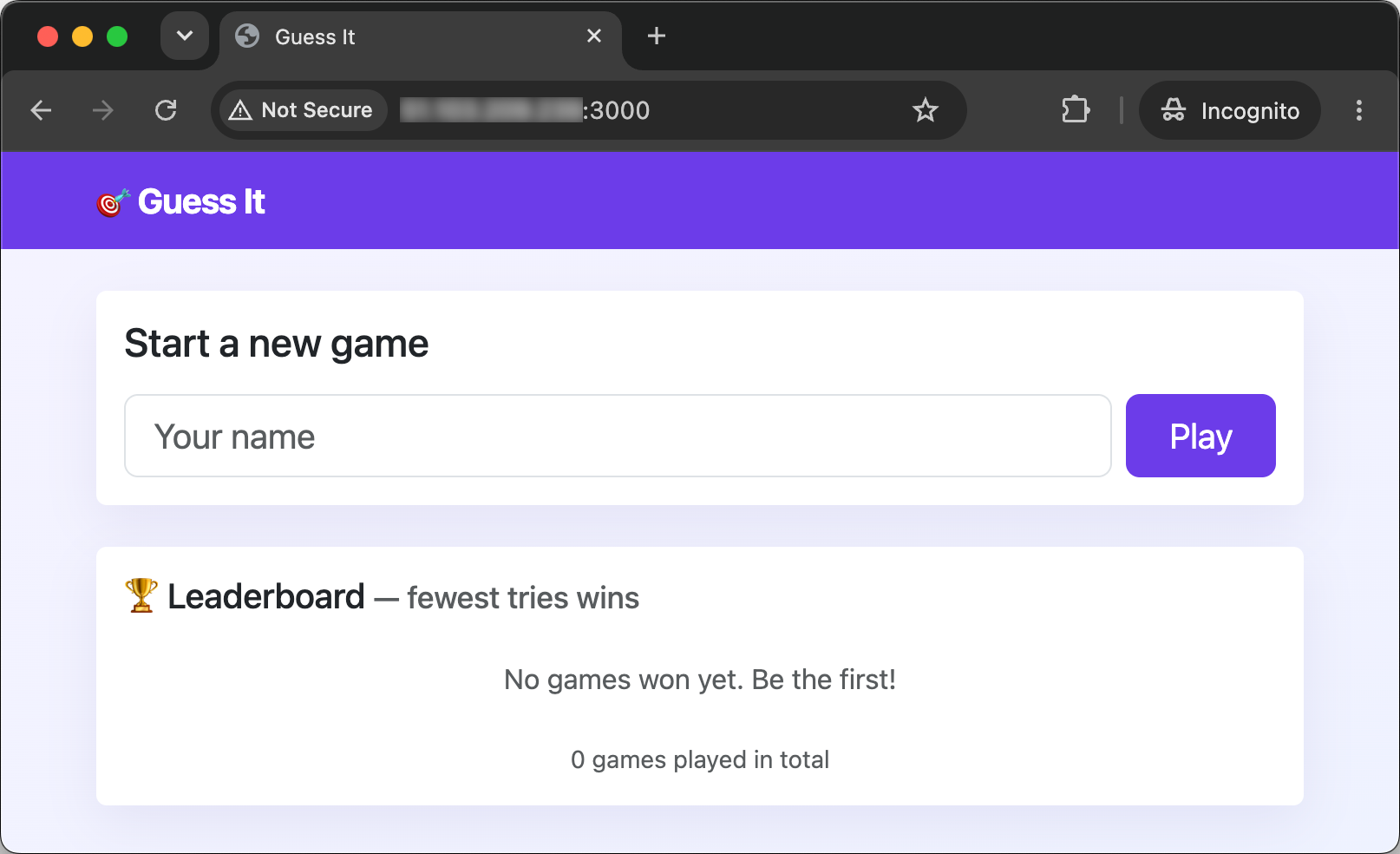
Open your server’s IP address and port 3000 in your browser (e.g.
http://W.X.Y.Z:3000). Play a game to the end: you will find it again on the
leaderboard of your new deployment.
Stop the SFTP deployment
Only one program at a time can listen on port 3000. If you started your SFTP
deployment again in the optional step above, stop it before you start the new
one: go to the terminal where it runs, and press Ctrl-C.
 Tip
Ctrl-C stops the command currently running in your terminal.
If you skipped that step, there is nothing to stop: your SFTP deployment stopped when the SSH connection you had started it in was closed, after the previous exercise.
Leave the guessit-ex directory you uploaded in your home directory where it
is: you will need the password it holds.
Create the deployment directory
By convention, Linux systems keep the files of what a server serves in the
/srv directory (for “serve”). You will deploy Guess It in
/srv/guessit rather than in your home directory. Look at the permissions of
your home directory:
$> ls -ld ~
drwxr-x--- 5 jde jde 4096 Nov  5 09:12 /home/jde
You, its owner, can read, write and enter it (rwx). The members of its group,
jde, can read and enter it (r-x). Every other user of the server can do
nothing at all with it (---): your home directory is closed to them.
A deployment is not one of your personal files, and other users will need to read it: in a later exercise, the application will run as a user of its own, which could not get into your home directory.
Now look at the permissions of /srv:
$> ls -ld /srv
drwxr-xr-x 2 root root 4096 Oct  9 14:30 /srv
/srv belongs to root, and only its owner may write in it (rwx). Every
other user, you included, may read and enter it (r-x), but not write in it.
Creating a directory in /srv means writing in /srv, so only root may do
it.
Create the directory with sudo, then give it to yourself (replacing both jde
with your Unix username):
$> sudo mkdir /srv/guessit

$> sudo chown jde:jde /srv/guessit

$> ls -ld /srv/guessit
drwxr-xr-x 2 jde jde 4096 Nov  5 09:14 /srv/guessit
The directory now belongs to you, so you can do everything else in it as
yourself, without sudo.
Warning
Do not run git clone or npm with sudo in this exercise. The files they
create would belong to root, and you would need sudo every time you update
your deployment.
Clone the repository
Instead of uploading files through SFTP, you will clone your fork of Guess It
from GitHub, on your server. Its public HTTPS URL is
https://github.com/YOUR_GITHUB_USERNAME/guessit-ex.git (replacing
YOUR_GITHUB_USERNAME with your GitHub username). You can also copy it from
your fork’s page on GitHub:
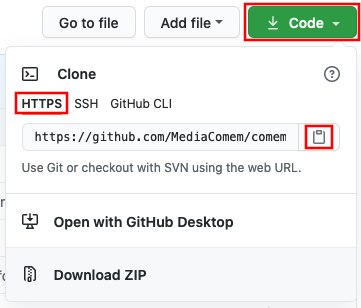
Why the HTTPS and not the SSH URL? As long as your repository is public, it is simpler to use the HTTPS URL to clone it, since it requires no credentials.
To clone the repository with the SSH URL from your server, you would need to have SSH public key authentication set up on your server the same way you did on your local machine. You would need to generate an SSH key pair on the server, and add its public key to your GitHub account (or to the repository’s Deploy Keys). Or you would need to put your own personal SSH key pair on the server, which would make it vulnerable in the event the server is compromised.
Clone your fork into the directory you have just created:
$> git clone https://github.com/YOUR_GITHUB_USERNAME/guessit-ex.git /srv/guessit
Cloning into '/srv/guessit'...
...The command to clone a Git repository is git clone <url> [<directory>]. The
directory is optional, and defaults to the last component of the URL’s path
without the “.git” extension. For example:
git clone https://github.com/bob/awesome-repo.gitwill create a directory named “awesome-repo”.git clone https://github.com/bob/awesome-repo.git foowill create a directory named “foo”.
Git can clone into a directory that already exists, as long as it is empty.
List what you have cloned:
$> cd /srv/guessit

$> ls -a
.  ..  .git  .gitignore  README.md  package-lock.json  package.json  schema.sql  server.js
There is no node_modules directory. The .gitignore file tells Git to ignore
it, so it was never committed: your fork does not have it.
Install the dependencies
Still in /srv/guessit, install the dependencies on the server, with the same
command you used on your computer:
$> npm ci

added 83 packages, and audited 84 packages in 2s
...
npm ci installs exactly the versions listed in package-lock.json, which is
committed in the repository. Your server downloads them itself, and ends up with
the same dependencies as your computer.
Tipnpm may also report vulnerabilities in some dependencies, and suggest running
npm audit fix. Do not run it on your server: it would upgrade some
dependencies and change package-lock.json there, so your deployment would no
longer match your repository. Git would show package-lock.json as modified.
Optional: compare with the SFTP deployment
Count the installed packages in both deployments:
$> ls /srv/guessit/node_modules | wc -l

$> ls ~/guessit-ex/node_modules | wc -l
Both numbers should be the same.
More informationThese are not the files you uploaded: npm downloaded the packages again, and
installed them on your server. But npm ci installs exactly what
package-lock.json lists, so it produces the same tree of dependencies wherever
it runs.
Update the configuration
The clone has the server.js of your fork. Look at its DATABASE_URL:
$> grep guessit: server.js
const DATABASE_URL = 'postgresql://guessit:change-me-now@localhost:5432/guessit';
Your application must connect with the password of the guessit database user,
which you chose during the previous exercise. Look at the DATABASE_URL of
your SFTP deployment, which has it:
$> grep guessit: ~/guessit-ex/server.js
const DATABASE_URL = 'postgresql://guessit:********************************@localhost:5432/guessit';
If both lines are the same, there is nothing to change. Otherwise, edit
/srv/guessit/server.js with nano or vim, and give its DATABASE_URL the
password of your SFTP deployment, with port 5432.
TipDo not run schema.sql again. The guessit database and user already exist,
and your new deployment uses them.
Warning
Do not commit this change on your server. Leave server.js modified, and do
not run git add or git commit in /srv/guessit. A commit would put your
database password in your repository’s history, and anyone could read it there
once it was pushed to your public fork. The next exercise will move the
configuration out of the code, so that there is nothing left to edit.
Optional: see what Git sees
If you have edited server.js, ask Git about it:
$> git status
On branch main
Your branch is up to date with 'origin/main'.

Changes not staged for commit:
...
        modified:   server.js
...

$> git diff
Git sees your configuration as a change to the code: server.js on your server
is no longer the one in the commit you cloned. Leave it that way, uncommitted.
Run the application
Still in /srv/guessit, start the application, as in the previous exercise:
$> npm run dev

> guessit@1.0.0 dev
> node --watch server.js

Guess It is listening on http://localhost:3000
You (and everybody else) should be able to access the application in a browser
at your server’s IP address and port 3000 (e.g. http://W.X.Y.Z:3000).
The leaderboard shows the games won on your SFTP deployment, if anyone won one: they are stored in the database, not in the application’s files.
What have I done?
You have deployed the same application again, but its code came from your fork on GitHub, through Git, instead of from a directory on your computer. You are now transferring code to your server with a version control tool rather than by hand, as recommended in the Codebase section of The Twelve-Factor App.
Along the way, you:
- Made a directory for the deployment in
/srv, and gave it to yourself. - Installed the dependencies on the server, from
package-lock.json. - Configured the database password on the server, without committing it.
What runs on your server is now a commit of your repository. You can name it, and Git tells you whether the files differ from it. An upload copies whatever is in a directory: an outdated copy, the wrong directory, or a few modified files forgotten along the way. Your server and your computer are two deploys of a specific version/commit of the same codebase, and neither is copied from the other.
The repository holds the code and the list of the dependencies, not the
dependencies themselves. package-lock.json names the exact version of each,
so the server can download and install the same ones as your computer, instead
of receiving hundreds of files over SFTP.
The deployment lives in /srv rather than in your home directory, because it is
not a personal file. Your home directory is closed to the other users of the
server, and other users will need to access the deployment in later exercises.
You used sudo only for what root must do: creating the directory. Once it
was yours, you did everything else as yourself, so the files belong to you.
Cloning with sudo would have made them root’s.
The new deployment uses the same database as the old one. The data is not part of the code: replacing the application’s files does not touch the games stored in PostgreSQL.
The configuration is still a change to server.js, made by hand on the server,
which Git sees as a modification of the code. It stays uncommitted, because a
commit would put the database password in the repository’s history. As long as
it is there, Git keeps it in the way of any new version of server.js you pull.
The next exercise moves the configuration out of the code.
Architecture
This is a simplified architecture of the main running processes and communication flow at the end of this exercise. It has not changed since the previous exercise: you have neither created new processes nor changed how they communicate. Only the directory Guess It runs from is different.
In this diagram, your browser talks to the Guess It application running on your server. Guess It talks to the PostgreSQL database server also running on your server. You started Guess It manually in your SSH session, in a shell running on the server.
Your terminal is still connected to your server over SSH, PostgreSQL is running with the application’s database, and the application’s files are on the server.
You run npm run dev, as on your computer. Your shell starts Guess It, which listens on port 3000.
You open a browser on your computer.
You type your server’s public IP address and port into it. It connects to port 3000, where Guess It is listening.
It sends an HTTP request for the home page over the connection, and waits for the answer.
Guess It works: Node.js runs its JavaScript code, which needs the leaderboard from the database.
Guess It connects to PostgreSQL on port 5432, with the database URL you configured.
It sends its query over the connection.
PostgreSQL works, running the query, while Guess It waits for the answer.
The rows of the leaderboard travel back to Guess It.
Guess It works again, building the HTML page from the rows.
The page travels back over the connection to your browser, with its stylesheets and scripts.
Your browser works, displaying the page.
Troubleshooting
Here’s a few tips about some problems you may encounter during this exercise.
destination path '/srv/guessit' already exists
git clone refuses to clone your fork:
$> git clone https://github.com/YOUR_GITHUB_USERNAME/guessit-ex.git /srv/guessit
fatal: destination path '/srv/guessit' already exists and is not an empty directory.
Git only clones into an existing directory if it is empty. If you have already
cloned your fork there, you do not need to clone it again: go into
/srv/guessit and carry on with the exercise.
If that clone is not one you want to keep, move it out of the way, then create the directory again:
$> sudo mv /srv/guessit /srv/guessit-old /srv/guessit/.git: Permission denied
git clone cannot write into the directory:
$> git clone https://github.com/YOUR_GITHUB_USERNAME/guessit-ex.git /srv/guessit
Cloning into '/srv/guessit'...
/srv/guessit/.git: Permission denied
The directory still belongs to root, because it was created with sudo. Give
it to yourself with sudo chown, as in Create the deployment
directory, then clone again.
Cannot find module 'express'
The application stops as soon as it starts:
$> npm run dev
...
Error: Cannot find module 'express'
Require stack:
- /srv/guessit/server.js
...
Failed running 'server.js'. Waiting for file changes before restarting...
The dependencies are not installed in /srv/guessit. Run npm ci there, then
start the application again.
Completed running 'server.js'
The application says it is listening, then stops at once:
$> npm run dev
...
Guess It is listening on http://localhost:3000
Completed running 'server.js'. Waiting for file changes before restarting...
Another program already listens on port 3000, most likely your SFTP deployment, if you started it again in the optional step. Guess It prints its message even when it cannot listen. Stop the other program as described in Stop the SFTP deployment, then start Guess It again.
password authentication failed for user "guessit"
The home page says that the leaderboard could not be loaded, and the terminal shows:
Could not load the leaderboard: error: password authentication failed for user "guessit"The password in the DATABASE_URL of /srv/guessit/server.js is not the one of
the guessit database user. Copy the password from the DATABASE_URL of your
SFTP deployment, in ~/guessit-ex/server.js, as in Update the
configuration.
If your SFTP deployment did not work either, see the same problem in the previous exercise.